
MailerLite Free Plan: Is It Worth It in 2026?
Want to know what you get with the MailerLite free plan?
Many of our readers are freelancers or small business owners who have asked us which email marketing tool offers a free plan that’s sufficient to start sending emails without spending any money.
MailerLite offers a free plan for up to 250 subscribers and 2,500 emails per month. It includes two users, campaign sending, 3 sign-up forms, 1 digital product, 1 landing page, 1 website, plus 3 automations, and access to hundreds of integrations.
In this guide, we break down the features and limitations of MailerLite’s free plan, how to choose the right premium plan for your needs, and how it compares to other free alternatives for creating email campaigns.

50% off your first month with MailerLite
Sign up for MailerLite’s Comfort or Power plan and get 50% off your first month. Don’t miss out!
What does the MailerLite Free Plan offer?
First of all, here are the features included in MailerLite’s free plan:
- Up to 250 subscribers.
- Send up to 2,500 emails per month.
- Drag-and-drop editor for designing newsletters.
- Create up to 3 basic automations.
- 1 website and 1 landing page.
- 1 digital product or appointment booking.
- 3 pop-ups or registration forms.
- More than 100 integrations, including Shopify, Canva, Claude, and ChatGPT.
What are MailerLite’s pricing plans?
In addition to the free plan, when you create an account with MailerLite, you’ll get a 14-day trial of the premium features without having to enter your credit card information. If you’re not ready to upgrade, you’ll automatically switch back to the free plan when the trial ends.
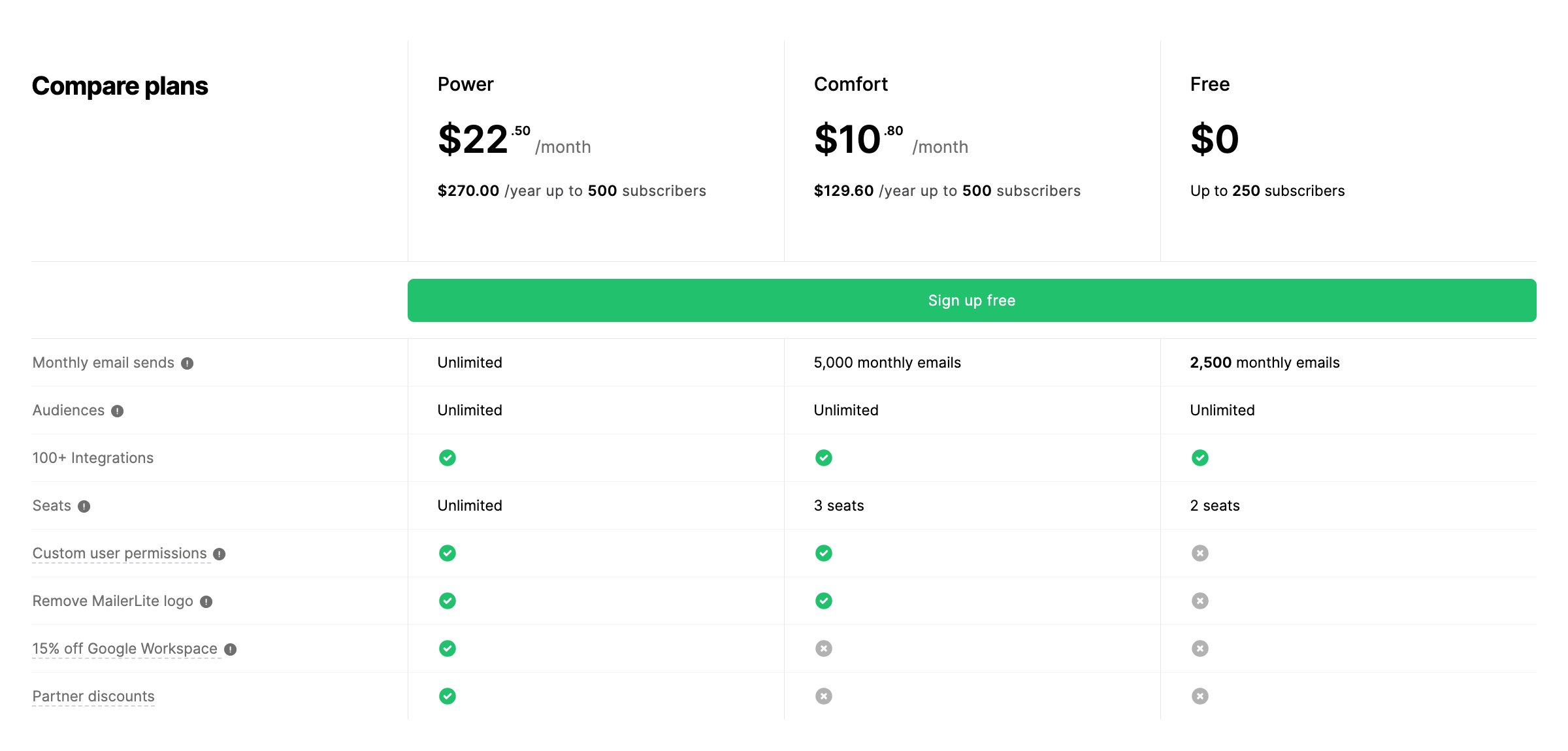
Premium plans unlock features such as the AI-powered writing assistant and subject line generator, removal of the MailerLite logo, and 24/7 email support.
- Free Plan: Free for up to 250 subscribers and 2,500 emails per month.
- Comfort Plan: Starting at $12/month for up to 500 subscribers and 5,000 emails per month.
- Power Plan: Starting at $25/month for up to 500 subscribers and unlimited email sends.
If you exceed the subscriber limit for the free account, you’ll receive a notification prompting you to upgrade to the Comfort plan. If you want to stay on MailerLite’s free plan, you’ll need to reduce your list to fewer than 250 subscribers.
👉 Be sure to check out our MailerLite Pricing Plans guide for more info which plan you should take.
Does MailerLite offer discounts?
In addition to the free plan, MailerLite offers three types of discounts right now:
- Annual billing: 10%. Applies to any payment plan, as long as you pay for one year upfront.
- Nonprofit organizations: 30%. Select “nonprofit” as your sector when you sign up and send support a document proving your legal status. Once approved, this status will remain linked to your account indefinitely.
- Promotions: MailerLite launches limited-time offers that provide a better discount than usual: It is currently offering a 50% discount on the first month of subscription.
👉 Click here for more information on the latest MailerLite discounts.
How do I remove the MailerLite logo?
You can remove the MailerLite logo from your newsletters by subscribing to the Comfort or Power plan. It’s one of the benefits of upgrading from the free plan to a paid plan, along with over 100 email templates and 24/7 live chat support.
If you’re looking for a 100% professional look with no third-party branding in your campaigns, removing the MailerLite logo is one of the reasons to upgrade to a paid plan.
👉 If you want to see the rest of the features that are unlocked, check out our MailerLite review.
Which is cheaper, MailerLite or Mailchimp?
MailerLite is one of the best alternatives to Mailchimp, but… which one is cheaper and offers a better free plan?
The short answer is MailerLite. With MailerLite, you can send 2,500 emails per month to up to 250 subscribers, while with Mailchimp you can send only 500. Same limit of 250 contacts, but five times fewer emails.
Below is a comparison table of MailerLite’s free plan versus Mailchimp’s:
|
Key Features |
MailerLite Free Plan |
Mailchimp Free Plan |
|---|---|---|
|
Subscribers |
250 |
250 |
|
Emails per month |
2500 |
500 (max. 250 per day) |
|
Users |
2 |
1 |
|
Low tier plan |
Comfort, starting at $12/month (500 subscribers) |
Essentials, starting at $13/month (500 contacts) |
If you decide to migrate from Mailchimp to MailerLite, the customer support team can assist you while you’re on your 14-day free trial. You can also complete the migration process on your own by following the steps in their video and help center.
FAQs
In this section, we briefly answer more questions about MailerLite’s free plan.
Is the MailerLite Free Plan worth it?
MailerLite Free Plan is a good starting point for getting familiar with the platform and getting started with email marketing, but it has a limit of 250 subscribers and 2,500 emails per month, and the MailerLite logo appears by default at the bottom of your newsletters, landing pages, and websites. Removing it requires upgrading to a paid plan.
Is MailerLite free forever?
As long as you need. MailerLite’s free plan doesn’t expire, but if you exceed 250 subscribers, your account will be paused until you reduce your subscriber list or decide to upgrade to a paid plan.
How much does MailerLite cost per month?
MailerLite offers one free plan and two paid plans. The Comfort plan starts at $12/month ($10.80/month when billed annually) for 500 subscribers and 5,000 emails per month.
Above that is the Power plan, which includes unlimited emails and automations, more users, and 24/7 support. For both plans, the price increases in tiers as your subscriber list grows.
Does MailerLite offer a trial for its paid plans?
Yes. When you sign up for MailerLite, you’ll have access to all premium features and support via chat and email for 14 days. You don’t need to enter a credit card, and you can switch back to the free plan once the trial ends.
How can I use MailerLite for free?
Here are the steps to use MailerLite for free:
1. Sign up with your email address on MailerLite and connect your website.
2. From the dashboard, you’ll have access to campaign design, automations, and subscription forms (limited to what’s offered in MailerLite’s free plan).
3. For the first 14 days, you’ll have access to premium features and priority support via chat and email.
4. After that period, your account will revert to the free plan’s limitations, and support will be limited to the help center.
Notice: Impulsa eCommerce is supported by our readers. If you make a purchase through a link on our site, we may earn a commission at no cost to you. Learn more.


