
MailerLite Review 2026: My Honest Take & Insights

Are you looking for a MailerLite Review and its key features? We´ve got you covered.
MailerLite is a marketing automation suite designed for small businesses, enabling users to send email marketing campaigns, set up marketing automations, create landing pages, and build contact forms to attract new subscribers.
It features an easy-to-use interface for building your subscriber list, allowing you to have up to 250 contacts without a paid plan.
In this guide, we will cover all the details about MailerLite, including its pros and cons, our review, and an overview of MailerLite’s plans and prices.
MailerLite Review
I recommend MailerLite for small businesses and beginners with a limited budget.
A daily-use platform for Email Marketing, with good deliverability and 24/7 support in English.

What is MailerLite?
MailerLite is a marketing automation platform designed to help entrepreneurs and small- to medium-sized businesses grow their audience and sales by automating email marketing campaigns.

It is more than just an email marketing tool, with frequent updates that further expand its functionality. Among its products, in MailerLite, we can find:
- Email campaign sending.
- Automated marketing workflows.
- Website and blog builder.
- Landing page builder.
- Digital product sales and eCommerce integrations.
- Sign-up forms and pop-ups.
That said, MailerLite offers an all-in-one marketing platform to streamline the day-to-day tasks of marketing teams and small businesses.
You can use it to create email newsletters, build marketing workflows, manage and segment your subscribers, clean and optimize your lists, etc.
Why choose MailerLite?
MailerLite combines ease of use, 24/7 support, advanced automation, and professional design, all at a good value for money.

MailerLite Pricing
MailerLite bases its plans on the number of subscribers. This means that as your subscriber list grows, you’ll need to upgrade to a higher plan.
The table below shows both monthly and annual pricing for a 500-subscriber plan.
|
Plan |
Monthly pricing |
Annual pricing |
Subscribers |
Emails / month |
|---|---|---|---|---|
|
Free |
$0 |
$0 |
250 |
2500 |
|
Comfort |
$12 |
$10.80 |
500 |
5000 |
|
Power |
$25 |
$22.50 |
500 |
Unlimited |
There are three MailerLite plans to choose from: Free, Comfort, and Power. You can subscribe with a monthly or annual payment (save 10% by paying yearly). Even on the free plan, you get access to the AI assistant and the AI subject line generator, plus one-click integration with your favourite tools to streamline your workflows.
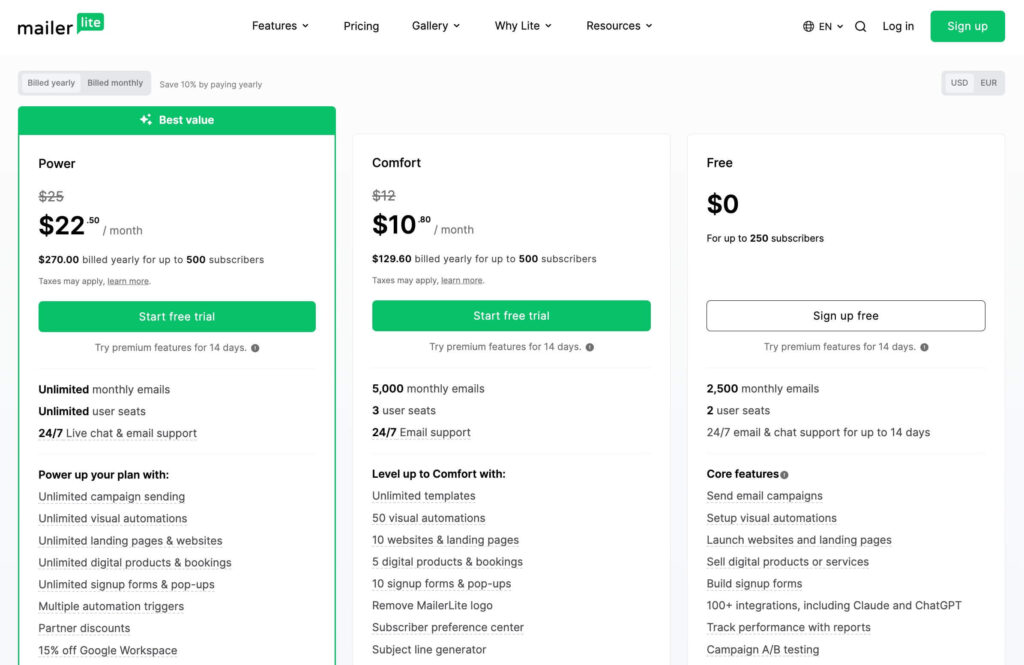
- The MailerLite free plan is limited to 250 subscribers, two user seats, and 12,000 emails per month. It includes most features, such as the drag-and-drop editor, automation creation, websites, landing pages, and forms. It’s perfect for getting started, although their logo will appear on the button of your newsletters.
- The Comfort plan starts at $10.80 per month (billed yearly) is ideal for selling digital products and managing campaigns, with 3 user seats and a larger number of forms and newsletter templates. Support is available 24/7 by email.
- The Power Plan starts at $22.50/month for up to 500 subscribers (billed yearly) with unlimited monthly emails and seats, priority 24/7 chat support, and advanced features such as a custom HTML editor and API and MCP server access.
As you can see, MailerLite maintains a very straightforward, fair and affordable pricing structure for all businesses. You can even take advantage of the 14-day free trial to try the premium features without entering your card details.
MailerLite Discount
If you’re ready to try MailerLite, going with an annual plan is the best way to save: Comfort and Power Plans include the equivalent of 3 free months when billed yearly.
👉 Check the current annual pricing here.
MailerLite Features
Now that we have seen what MailerLite is and its pricing, let’s take a closer look at its key features.
Email Marketing Campaigns
Once you’ve set up your account and contacts, it’s time to design and send emails to your subscribers.
Editing elements include newsletter editors, pre-designed templates, and specific settings for typography, backgrounds, button styles, and other adjustments.
MailerLite has also made it easier to keep every campaign on-brand: paste in your website URL and it auto-imports your logo, fonts, colors, and social links, with a live preview before anything saves.
There are also 2 new auto-branded templates ready to use straight away, and you can save your own for future campaigns. Before sending, you can preview the newsletter in a web browser and on a mobile device to check any last-minute edits.
Additionally, MailerLite integrates eCommerce platforms like Shopify, BigCommerce, or WooCommerce to facilitate the sale of physical and digital products.

Email Marketing Automation
MailerLite lets you build email marketing automations based on “triggers“: events that automatically launch a specific workflow when they occur.
For example, you can use them to send welcome emails, messages tied to key dates such as birthdays, Black Friday, or Christmas, and reminders about upcoming subscription renewals.
When building these sequences, you can also run A/B tests, set up flows to reduce cart abandonment, and send order confirmations with cross-selling recommendations.

MailerLite also provides real-time tracking and workflow analytics, where you can see the activity of each automation, including open rate, average clicks, deliverability, and bounce rate.
👉 Most automations are available on your free plan. Advanced features, such as multiple triggers, are available on your paid plan.
MailerLite recently expanded its e-commerce triggers: Abandoned cart now splits into two (cart abandoned vs. checkout started but not completed), plus a new Purchase frequency trigger for repeat buyers, plus variant-level targeting for specific products.
Sign-up forms and pop-ups
Subscription forms and pop-ups can be effective in converting visitors into subscribers. In this regard, MailerLite allows you to design five types of pop-ups, including an exit pop-up and a fixed type that appears as the user scrolls down the page.

MailerLite also offers customizable sign-up forms that allow you to capture subscribers directly on your website or online store. These forms comply with GDPR (you can add checkboxes), enable audience segmentation, and offer optimization options such as A/B testing and real-time tracking.
MailerLite Website Builder
In addition to the marketing automation features you can expect from MailerLite, there are other products, such as its website and blog builder.
With this feature, you can take advantage of its drag-and-drop function and design websites without any technical knowledge. In my opinion, it’s not yet on par with other alternatives.
Currently, there are better website builders that integrate seamlessly with MailerLite through their app or official plugin.

Performance tracking
The dashboard, which provides a summary of your MailerLite campaigns’ performance, offers an analysis of the total number of active subscribers compared to other periods, allowing you to track the trend of new subscribers on your list.
It also allows you to view other metrics, such as the number of campaigns and emails sent, the average conversion rate for forms and pop-ups, and the number of people currently in automation workflows.

Each campaign also has its own Dashboard, where you can see all the statistics. Personally, I find MailerLite more intuitive and easier to understand than other tools.
Marketing integrations
As a digital business owner, it’s essential to have tools that integrate with the other tools you use in your daily life.
In this regard, MailerLite offers integrations across categories such as CRM, eCommerce, WordPress, email verification, event planning, video, surveys, landing pages, project management, and more.
To name a few integrations, you can use MailerLite with Canva, ChatGPT, Claude, Shopify, Zendesk, Zapier, Wix, Stripe, WordPress + WooCommerce, or Facebook, among others.

MailerLite for WordPress
MailerLite is one of the best email marketing plugins for WordPress. You can import contacts from both WordPress and WooCommerce.
When installing the plugin, you can select a MailerLite group to which your WooCommerce customers will be added. Additionally, you will have access to additional e-commerce features, such as designing abandoned-cart emails and tracking shipments.
If you use Elementor, you can also integrate MailerLite into the contact forms you add to your Elementor pages.
MailerLite Pros and Cons
These are some of the pros and cons of MailerLite, based on our testing of the platform and its features.
Pros
Cons
Mailerlite Alternatives
MailerLite is not the only marketing automation software out there. If, after reviewing this review, you don’t think it’s the right choice, here are our alternatives.
MailerLite vs Mailchimp
One of the main alternatives to Mailchimp is MailerLite. Regarding pricing, MailerLite offers a more generous free plan than Mailchimp, with 500 subscribers and the ability to send up to 12,000 emails. When comparing the premium plans, Mailchimp is more expensive than MailerLite.
On the other hand, when comparing their features, both tools offer advanced analysis and segmentation capabilities, as well as additional marketing tools.
We recommend choosing MailerLite if you’re looking for an affordable email marketing software for beginners, an easy-to-use option with basic tools to get started.
If you require more integrations and are willing to pay more, Mailchimp offers more advanced marketing tools, though the learning curve will be steeper.
MailerLite vs Klaviyo
MailerLite is better for small businesses and beginners, while Klaviyo excels for established e-commerce brands. The key difference is that MailerLite offers competitive pricing with a generous free tier, making it ideal for cost-conscious businesses. In contrast, Klaviyo’s pricing is higher but justified by its advanced features.
MailerLite vs ActiveCampaign
An advanced email marketing and CRM platform, perfect if you need to perform more advanced automations. The initial price is a bit higher than MailerLite’s, but you get what you pay for: it’s one of the most powerful platforms on the market.
Support
MailerLite stands out for consistently positive reviews of its support and customer service, which are available in multiple languages. They have a help center, a free academy, and a community forum for quick answers to specific issues.

However, the live chat option is available only on their Power Plan, and the free plan offers only 30 days of support. In this regard, the support seems somewhat limited to us. It also does not provide phone support for advanced users.
Final verdict: Should you use MailerLite in 2026?
For me, MailerLite is a perfect email marketing platform for small businesses and beginners.
Our experience with the platform has been very positive. We like its simplicity and ease of use. Its pre-designed templates help you save time when creating newsletters, and it offers a generous free plan for up to 250 contacts.
However, it may not be the best option for e-commerce store owners and users with complex automation needs or sales funnels.
If you want to check out other email marketing tools, take a look at the other guides below:
We hope that this information has helped you make an informed decision.
MailerLite Review (2026): My Honest Take & Insights

MailerLite Review for email marketing and automation. We analyze its plans, how it works, pros and cons and its solutions for entrepreneurs in 2026.
Price: 12
Price Currency: USD
Operating System: iOS, Android
Application Category: Email Marketing
4.6
FAQs
These are some of the questions most frequently asked by users about MailerLite.
Which is better, Mailchimp or MailerLite?
MailerLite is a tool aimed at small businesses with limited budgets. Its free plan is one of the best, and its platform is intuitive and sufficient for small-team email use. If you require more advanced features and access to AI integrations or e-commerce capabilities, consider Mailchimp.
Who uses MailerLite?
Some users of MailerLite include small and medium-sized businesses, bloggers, online stores, marketing agencies, and non-profit organizations. Its ease of use makes it the perfect tool for any business, regardless of stage or size, that is just getting started with email marketing.
Is there a MailerLite App?
Yes, one of the advantages of using MailerLite is its mobile apps for iOS and Android, which let you manage your email campaigns, monitor performance, and manage subscribers on the go.
Is MailerLite free?
Yes, MailerLite is free. It offers a generous free plan that includes essential email marketing features without requiring a credit card, plus up to 250 subscribers and 2500 emails per month.
How much does MailerLite cost?
MailerLite has a free plan plus two paid tiers: Comfort (from $10.80/month, billed annually) and Power (from $22.50/month, billed annually, up to 500 subscribers). Both paid plans come with a free trial before you need to enter card details.
Who should not use MailerLite?
Large eCommerce businesses and enterprises with complex automation needs might encounter scalability limitations with MailerLite. It’s best to use more robust providers, such as Omnisend, ActiveCampaign, or Klaviyo.
Notice: Impulsa eCommerce is supported by readers. If you purchase through a link on our site, we may earn a commission at no cost to you. See more.


