
pCloud Review (2025): What Makes It Stand Out in Cloud Storage?

pCloud is one of the best cloud storage providers thanks to its affordable prices, features, and ease of use. Additionally, it offers one of the most affordable lifetime cloud storage services on the market.
pCloud prices start at just $49.99 per year, making it the best option for individuals who want to store multimedia content and documents easily, as well as for team collaboration.
To help you decide whether it’s a good option for you, we have reviewed pCloud across ease of use, performance, security, pricing, and customer support.
pCloud Review
pCloud is the best option if you plan to store multimedia content, with features such as sharing, automatic backups, and access to your files from any device.
What is pCloud?
pCloud is a relatively young cloud storage service compared to Dropbox or Google Drive. It began in 2013 and has since gained the trust of 20 million users.
Currently, pCloud offers plans for individuals, families, and businesses, as well as lifetime plans, with some of the most competitive prices on the market.
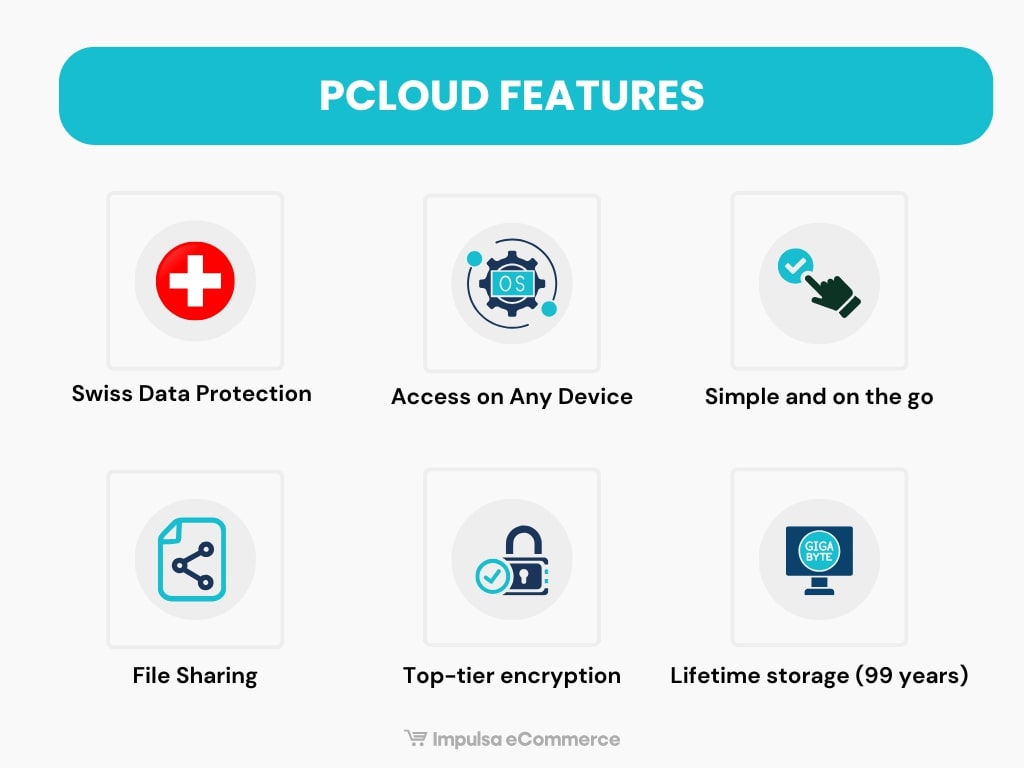
Some of pCloud’s key features include:
- Swiss data protection: pCloud is based in Switzerland, one of the countries with the strictest laws regarding the privacy and security of its users’ data.
- Servers in the USA and EU: pCloud allows you to securely store your data in certified data centers located within the EU or the United States when you create your account.
- Available on any device: pCloud is compatible with Android, iOS, Windows, Linux, and Mac, and also accessible from any web browser.
- TLS/SSL Encryption: your data is encrypted, and you can add passwords, confidential documents, or sensitive photos without worries.
- Available space: pCloud offers flexible plans according to your needs, from 500 GB to 10 TB of cloud storage.

Receive a 33% discount for a limited time when you sign up for a lifetime cloud storage plan with pCloud (500 GB, 2 TB, or 10 TB).
pCloud pricing
Now that we’ve analyzed what pCloud is, we’ll cover the costs associated with pCloud.
First, you can sign up for pCloud and receive up to 10 GB of free space by completing some simple actions, such as verifying your email, uploading a file, or downloading the pCloud and mobile apps.
If you need more space, you can upgrade to one of their Premium plans, available with monthly, annual, or lifetime billing cycles.
Individual plans
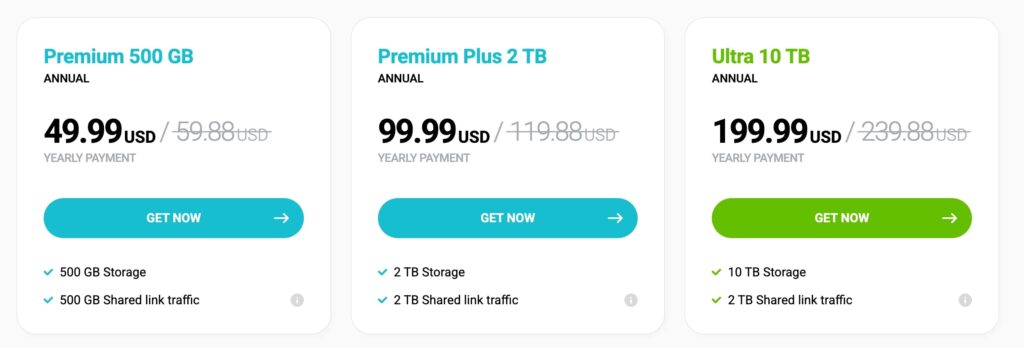
pCloud’s cloud storage offerings are divided into plans of 500 GB, 2 TB, or 10 TB, with discounts available for those who sign up for an annual or lifetime payment plan.
In all plans, shared link traffic is included at the contracted GB level, meaning that if you subscribe to a 500 GB plan, you get 500 GB of traffic for sharing links with other users (even if they don’t have a pCloud account).
Lifetime Cloud Storage
pCloud offers lifetime cloud storage with a one-time payment. The available plans are 500 GB, 2 TB, and 10 TB. A great deal if you plan to use their services for up to three years.
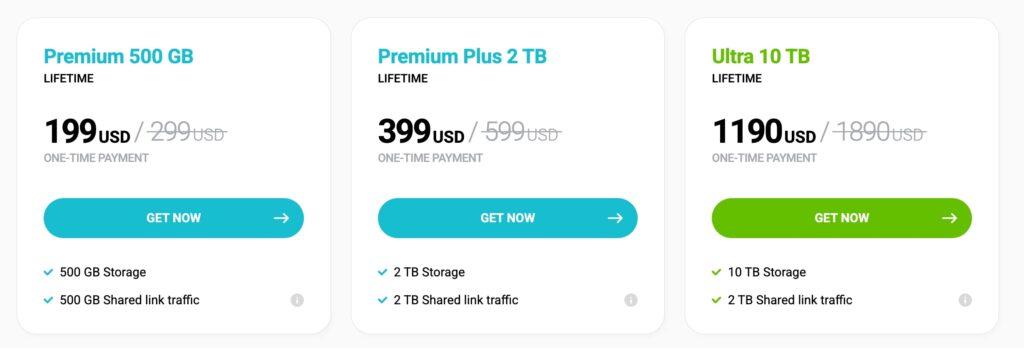
One advantage of pCloud’s lifetime storage plans is that they do not expire or require ongoing activity; they remain available indefinitely.
You can receive a 37% discount and upgrade your storage at any time, from 500 GB to 2 TB or 10 TB, as needed. On the other hand, if you first subscribe to an annual plan, you can upgrade to a Lifetime plan at any time.
pCloud Family
With pCloud Family, you and your family can share up to 10 TB of cloud storage for life, supported by up to 4 family members, and enjoy 30 days of file history for recovery. Each family member gets their own space and separate account from the rest.
The family plan offers two lifetime options with a one-time payment:
- Family Plan 2 TB – $ 595 (33% off).
- Family Plan 10 TB – $ 1499 (33% off).
pCloud Business
pCloud offers two business plans (Business and Business Pro) with flexible storage options tailored to your team’s needs.
- Business: 1 TB per user: $ 9.99 per user (minimum three users).
- Business Pro: 2 TB per user: $ 14.98 per user (minimum three users).
Both plans include up to 3 users, pCloud Encryption, team member access control, secure sharing, and 180 days of file versions.
pCloud Business plans offer a free 30-day trial, while individual and family plans do not.

pCloud additional tools
In addition to the mentioned plans, pCloud has several additional tools for greater security and control over how your files are shared.
1. Link traffic statistics
Unlike other services like Dropbox, pCloud allows you to monitor traffic from your links and purchase more storage if you frequently share large files. To view this, go to my.pCloud > Shared > Links > Statistics.
If you exceed the limit, additional traffic can be purchased starting at 2 TB for $9.99/month.
2. Extended revision history
The Extended File History allows you to record all changes to the account files for up to 365 days, making it easy to recover data after deletion or modification.
3. pCloud Pass
pCloud Pass is a password manager that protects your credentials with end-to-end encryption. Available on mobile devices, browsers, and computers, it enables you to store, autofill, and manage passwords with ease.
4. Crypto folder
pCloud Crypto is an encrypted folder that protects sensitive files, such as photos, videos, and personal documents. No one will be able to access your files, as they will require a key that will be provided upon subscription.
You can use it on any device connected to pCloud to move files in or out of the encrypted folder at any time.
The service is free for 14 days, and you can subscribe for $49.99 per year or for a lifetime at $150.
pCloud key features
After analyzing the various plans and prices, the following are the most notable features of pCloud.
pCloud Web
In addition to using pCloud on any device via its desktop and mobile apps, you can access your account in a web browser.
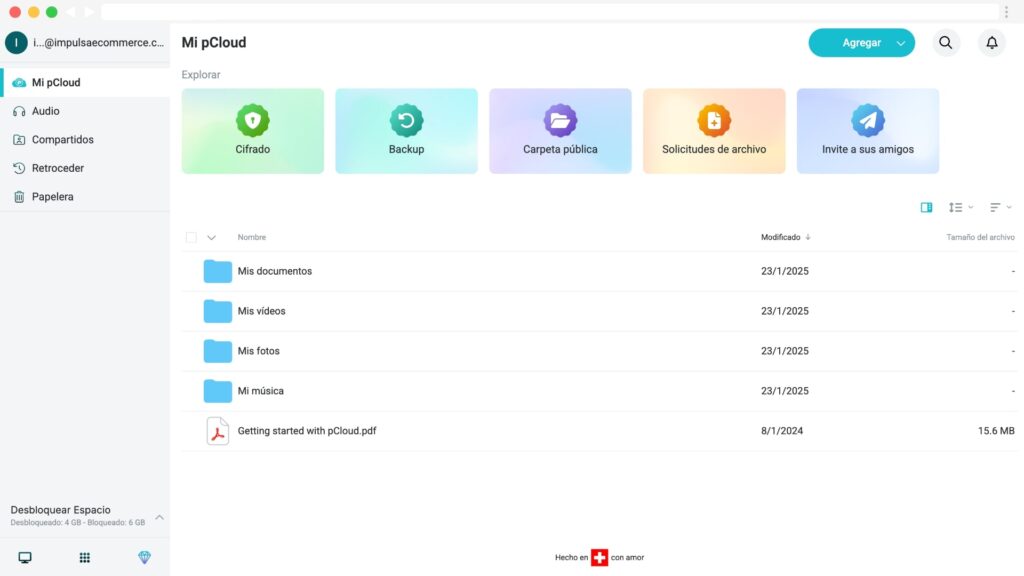
From this panel, you can configure most of your account settings, organize your folders and files, and arrange them in a grid view.
On the left menu, you can access your multimedia content, shared files with others, or restore and rewind file version histories up to 15 days.
If you click on your email, you can also change your account language, set up two-factor authentication (2FA), view your payment history, and more.
Additionally, pCloud offers web browser extensions for Firefox and Chrome that let you save audio, video, images, or text directly to your account.
pCloud Backup
The pCloud backup function automatically syncs the folders and files you select from your computer in real time. If you make any changes, they will be updated in your pCloud account and on your device.
On the other hand, if you delete a file or folder, it will be moved to the pCloud Trash for up to 30 days (or 1 year with pCloud’s Extended File History).
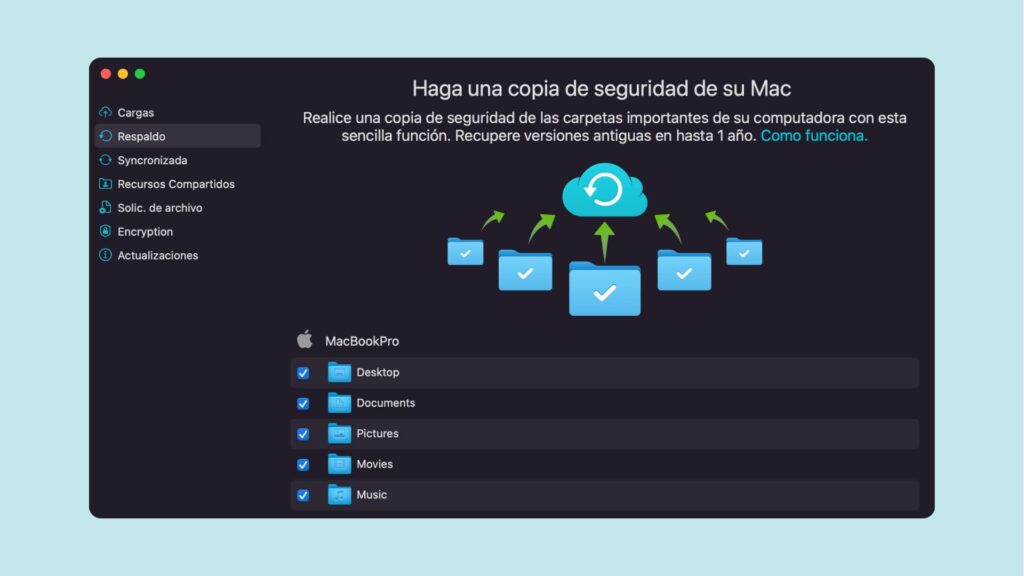
To set up a backup with pCloud Drive, download and install the pCloud Drive app, then go to Preferences, select the Backup option, and choose the folders you want to back up to the cloud.
Another highlight is the ability to back up data from social networks and other cloud services. You can connect Facebook to import your photos and videos into pCloud, or import files from your OneDrive, Dropbox, or Google Photos accounts.
pCloud Drive
If you are wondering how pCloud Drive works, the answer is straightforward. You download the application compatible with your operating system, install it, and log in with your pCloud account.
The pCloud desktop application creates a virtual drive where you can access and edit your pCloud files, just like any other file on your computer, without occupying space on your computer.
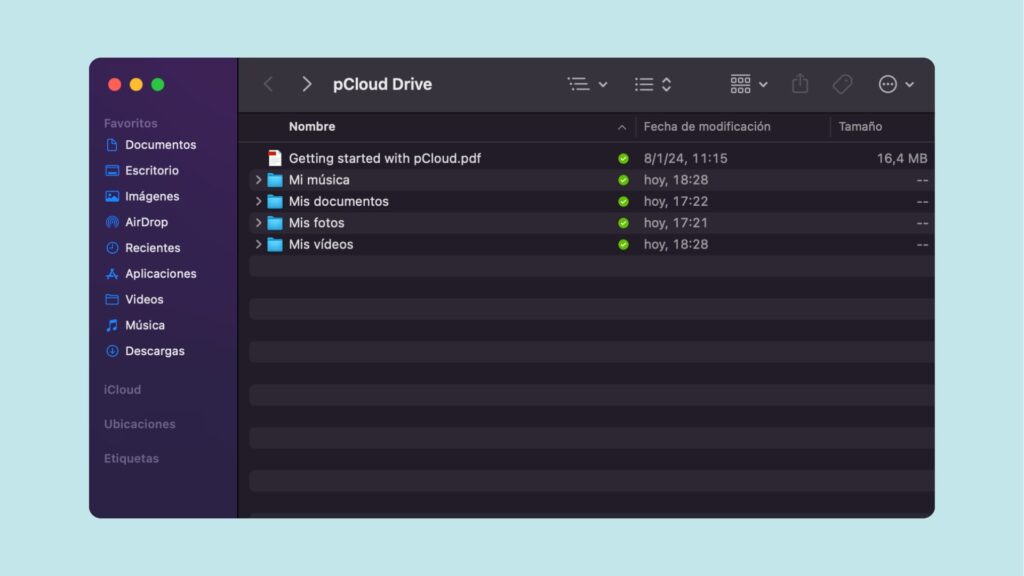
Once the files are uploaded, you can right-click and create a shared link with a password or expiration date to send to friends or family.
pCloud Transfer
pCloud Transfer is a free service that allows you to transfer files of up to 5 GB without creating an account. If you register with pCloud, you’ll be able to send unlimited files with no speed or file size limits, along with many other features.
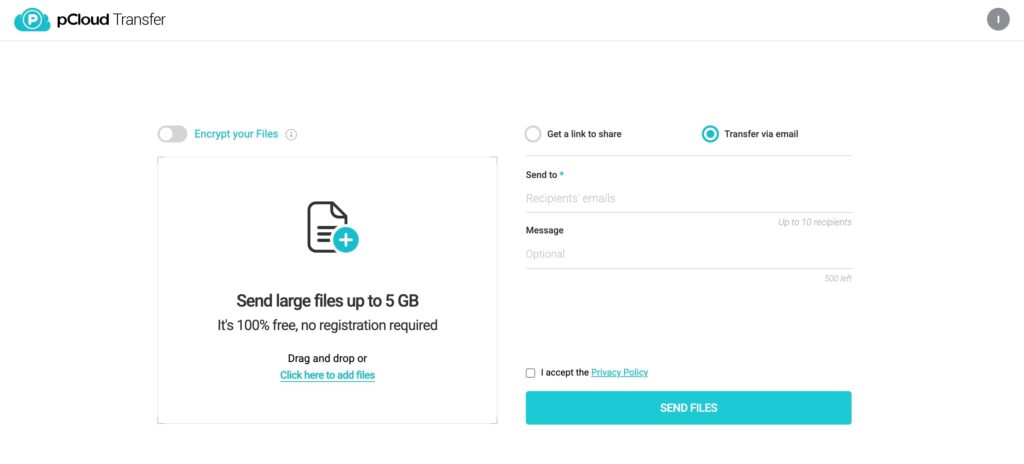
To send files via pCloud Transfer, visit https://transfer.pcloud.com/.
Collaboration tools
When it comes to collaboration, pCloud offers a range of tools.
- Shared folders: share folders with other pCloud users to collaborate as a team from anywhere.
- Shared links: share large files with anyone, even without a pCloud account. Protect your links with passwords or expiration dates.
- File requests: Receive files directly from anyone into your pCloud account without needing to share access.
- Direct links: Use the public folder to create direct links to files, host static HTML sites, or embed images with your brand or business.
pCloud player
pCloud Player is a multimedia player that allows you to enjoy your music from anywhere, whether through the mobile app or the web interface. It offers features such as loop playback, shuffle, and downloads for offline listening.
Additionally, it offers various listening modes for users who wish to share playlists with others or listen in podcast mode.
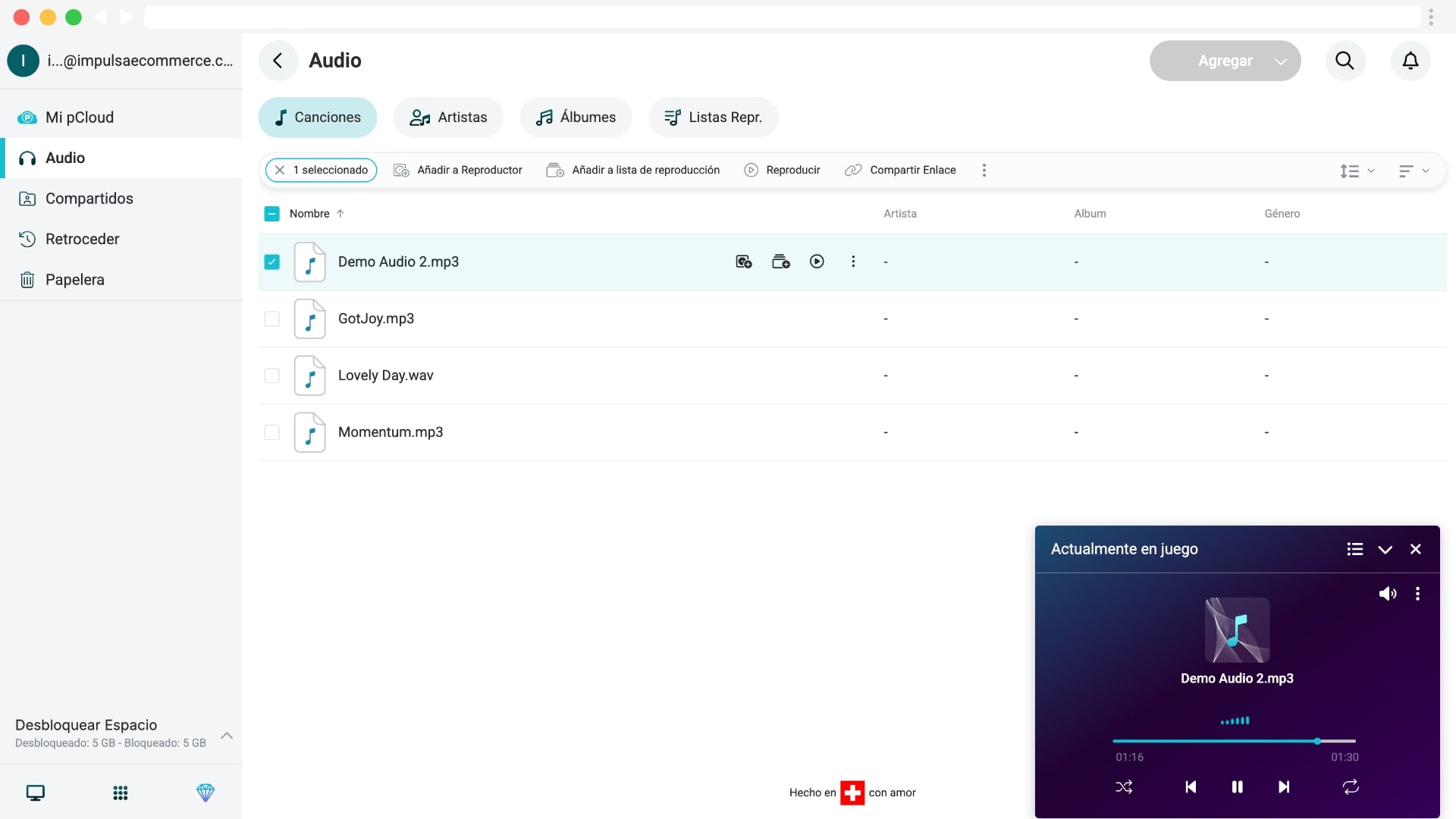
Background playback reduces battery consumption and allows you to control your music with headphones or connected devices without needing to return to the app. Additionally, it includes an integrated video player and has no file size or speed limits.
Customer Support
Regarding customer support, pCloud offers email and an AI assistant for specific questions. However, there is no live chat or contact phone number for premium accounts. The good news is that they have support in English.
|
Support channels |
Available on pCloud |
|---|---|
|
| |
|
Live-chat | |
|
Video tutorials | |
|
Help Center | |
|
Phone support |
Finally, the pCloud website includes an English-language help center with installation guides and a FAQ section.
Pros and Cons of Using pCloud Cloud Storage
After analyzing pCloud, here are the pros and cons.
Pros
Cons
Conclusion
In our opinion, pCloud stands out from other alternatives because of its lifetime plans and the speed of its web, desktop, and mobile app versions. Overall, we recommend this cloud service to anyone interested in securely and privately storing multimedia content.
Additionally, for just a few bucks more per month, you can add the crypto folder to store sensitive files or recover file versions up to 365 days with their Extended File History (EFH).
However, suppose you need collaboration tools between teams or document editing. In that case, there are other, more comprehensive alternatives to pCloud, such as Dropbox or Google Drive, that offer greater control over collaborative file use.
This concludes our pCloud review. We hope this information helps you choose the best cloud storage service.
pCloud Review: What Makes It Stand Out in 2025?

pCloud Review (2025): Features, pricing, and everything you need to know about one of the most secure cloud storage services.
Price: 4.99
Price Currency: USD
Operating System: Windows, Mac OS, Linux, Android, iOS
Application Category: Cloud Storage
4.5
FAQs
These are the most frequently asked questions about pCloud reviews.
Does pCloud have a free plan?
You can get up to 10 GB of storage without paying for a plan. This is possible by performing simple actions, such as installing your desktop or mobile app, uploading a file, or sharing it with someone else.
What is pCloud’s cheapest plan?
pCloud’s most budget-friendly subscription costs $49.99 per year for up to 500 GB of storage.
What is pCloud Lifetime?
pCloud Lifetime is a lifetime storage plan available in 500 GB, 2 TB, or 10 TB, with a one-time payment and no inactivity clauses.
How many users does pCloud have?
Currently, over 20 million users worldwide use pCloud.
Is Dropbox better than pCloud?
pCloud is an excellent alternative to Dropbox if you’re looking for a lifetime cloud storage plan. Additionally, some features, such as the music and video player, are faster and more intuitive than those in Dropbox.
Which pCloud plan offers the best value?
pCloud’s lifetime plans provide the best value for money, with regular promotions of up to 50%. In the long run, this results in significant savings compared to individual plans with annual billing.
Notice: Impulsa eCommerce is supported by readers. If you purchase through a link on our site, we may earn a commission at no cost to you. See more.
